When you’re ready to build or redesign a website, one of the important decisions is: What CMS should I use? The right choice affects how easy it’ll be to update content, maintain the website, grow your enterprise, and stay ahead in search engines.
Many businesses start their website journey without thinking much about the content management system, but soon understand it it impacts everything, from how fast they can update a page to how well the site performs on Google.
In this blog, you’ll learn which platforms best fit your business goals, budget, and plans.
The Most Popular CMS Options
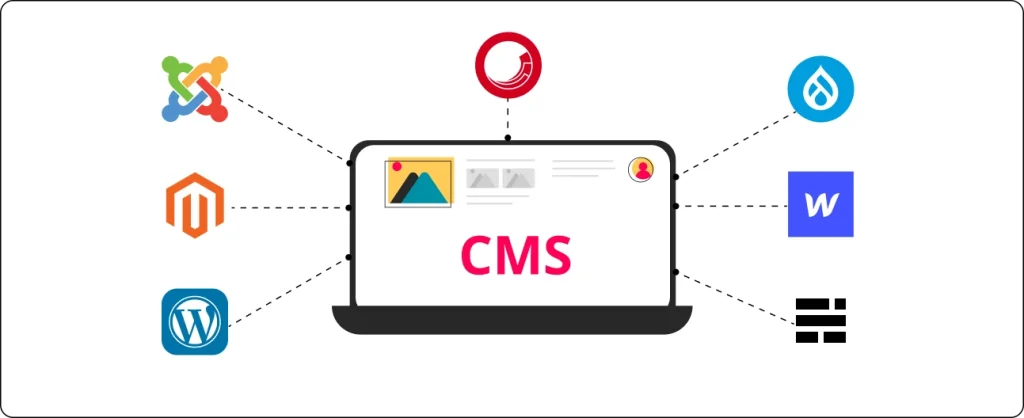
With so many CMS systems available today, selecting one may feel overwhelming. Every system claims to be the best, but the truth is, each has its own strengths and weaknesses.
The right CMS for you relies on what type of website you’re building and how comfortable you are with technology.
Let’s take a look at the most popular CMS options and what makes them stand out.
- WordPress
- Webflow
- Wix
- Squarespace
- Shopify
- BigCommerce
- Drupal and Craft CMS
WordPress
When people talk about CMS, they usually mean WordPress, and for a good reason. WordPress powers over 40% of all websites on the internet. From small blogs to huge business enterprise sites, it can handle almost anything.
What makes WordPress websites so famous is the freedom they provide. You have complete control over the design and capability of your website. With thousands of themes and plugins, you could easily upload features like contact forms, booking systems, or online shops, all without writing any code.
Pros
- Easy to use, even for beginners
- Huge community support and tutorials
- SEO ready (great for ranking on Google)
- Works for blogs, business sites and e-commerce
Cons:
- Needs updates and maintenance
- Requires hosting setup and security care
Best for:
Small to medium businesses, service websites, blogs, and WooCommerce online stores are using it.
If you want flexibility and long term control, WordPress is a safe and smart choice
2. Webflow
Webflow has become very popular among designers and agencies because of its visual design freedom. It lets you build custom websites using a drag and drop interface, but with the power of real code behind it. The result is a fast, responsive and professional looking website, without needing a developer for every change.
Webflow also takes care of hosting, security, and updates, so you can focus on design and content instead of technical issues.
Pros
- Visual design tools, no coding needed
- Built in hosting, SSL and backups
- Fast loading speed and clean code
- Great for design focused businesses
Cons:
- Monthly subscription cost
- Fewer plugins and integrations than WordPress
Best for:
Creative agencies, startups and businesses that want a unique, modern design without too much technical work.
3. Wix
Wix is a drag and drop website builder made for beginners. It’s perfect for individuals who need a simple, good looking website without worrying about web hosting or code. Everything occurs in one place. You pick a template, edit it, and submit your site within hours.
However, Wix can be limiting if you want to expand later. Once you start, it’s not easy to move your website to another CMS.
Pros
- Super easy to use
- Templates for all types of websites
- Hosting and maintenance included
Cons:
- Limited flexibility and customization
- Hard to migrate to another CMS later
- SEO tools are basic
Best for:
Small business owners, freelancers and personal websites.
Squarespace
Squarespace is another beginner friendly platform that focuses on beautiful design. It’s often used by photographers, artists, restaurants, and small brands who want a clean, modern site that looks professional without hiring a designer.
Everything, hosting, templates, analytics and security is included in your plan. You only pay monthly and manage everything in one dashboard.
Pros
- Stunning design templates
- Mobile responsive layouts
- Simple drag and drop editing
- All in one solution (no plugins needed)
Cons:
- Less flexible for developers
- Limited custom features
- Slightly higher pricing
Best for:
Creative professionals and small brands who want a stylish website that’s easy to manage.
Shopify
If your main aim is to sell products online, Shopify is one of the best CMS platforms you can choose. It’s built for eCommerce from the ground up, which means everything you need to start, run, and grow your shop is already included.
You can easily add products, manage inventory, accept payments and track orders, all in one dashboard. It also offers beautiful themes and a clean editor that makes it easy to design your Shopify online store, even when you have no web experience.
Pros
- All in one eCommerce platform
- Secure and fast hosting
- Support all major payment options
- 24/7 support and simple setup
Cons:
- Monthly subscription fees
- Limited design flexibility compared to WordPress
Best for:
Retailers, small businesses, and online stores that want to start selling fast with minimal technical setup.
BigCommerce
BigCommerce is another strong option for online shops, especially if you plan to scale and grow in the future. It gives you more built in features than Shopify, so you rely less on third party apps.
From product catalogs to checkout customization and integrations with ERP or CRM tools, BigCommerce offers enterprise level control. It’s a perfect CMS for businesses that already have traffic or multiple sales channels and want to handle everything in one system.
Pros
- Scalable and strong performance
- Advanced features built in
- Works well for large product catalogs
- Integrates easily with WordPress and other tools
Cons:
- Setup can feel complex at first
- Higher cost than beginner platforms
Best for:
Growing online stores, wholesalers and brands that need advanced eCommerce management.
Drupal and Craft CMS
If you’re building a large, content heavy or high security website, systems like Drupal or Craft CMS are a great choice. These structures are recognized for stability, security and scalability, often used by universities, government portals, and large corporations.
They require developer support, but they’re built for performance and flexibility. Drupal, specifically, has strong user permission systems and handles multilingual content thoroughly.
Pros
- Highly secure and stable
- Perfect for complex websites
- Customizable for advanced needs
Cons:
- Needs professional setup
- Not beginner friendly
- Higher maintenance cost
Best for:
Large organizations, educational institutions or government websites.
Common Mistakes When Choosing a CMS
Many people make simple mistakes that cause problems later. Here’s what to avoid:
- Choosing a CMS only because it’s free
- Ignoring future needs, like multi language or online store
- Installing too many plugins
- Not thinking about SEO or page speed
- Forgetting about backups and updates
- Picking a CMS that no one on your team can use
A good CMS should make website management easy, not complicated.
How Nettsidedesign.no Can Help?
We help businesses find and build the right CMS solution. Our nettsidedesign.no team designs websites that look great, load fast and are easy to manage.
We work with:
- WordPress
- Shopify
- BigCommerce
We focus on:
- SEO ready structure
- Clean design
- Simple content management
- Secure hosting and updates
Whether you’re starting from scratch or need a redesign, we’ll help you choose the CMS that fits your business, not only today, but in the long run. Contact us and let’s get started.
Key Takeaways
- A CMS helps you manage website content without coding.
- Choosing the right CMS affects design, SEO and performance.
- WordPress is the most flexible and most used CMS.
- Webflow offers visual design and low maintenance.
- Wix and Squarespace are simple tools for beginners.
- Drupal and Craft CMS fit complex websites and large organizations.
- Shopify is ideal for small to medium online stores.
- BigCommerce fits growing e-commerce businesses.
- Your CMS should grow with business needs.
FAQs
How much does a CMS website cost?
It depends on the CMS and your needs. WordPress is free, but you’ll pay for hosting and plugins. Webflow and Wix include hosting but charge monthly fees.
What is the best CMS for beginners?
WordPress and Wix are great for beginners because they’re easy to use and don’t require coding.
Which CMS is best for SEO?
WordPress and Webflow both have strong SEO tools. You can easily add meta tags, alt text and optimize your site for search engines.
Is WordPress better than Webflow?
Both are great. WordPress offers more flexibility and plugins, while Webflow gives you a clean design and easier maintenance.