When people plan a new website, they often mix up UI and UX. Many think both mean the same thing. Some even use them as one word. In reality, UI and UX play different roles in web design. Both are needed to build a website that looks good, feels easy and supports business goals.
Around 94% of a user’s first impression is based on how a website looks. Users expect a clean design, fast loading, and a clear structure. They leave fast if a website feels confusing and slow. A strong UI and UX help you meet these expectations and build trust.
This guide explains UX vs UI design. You will also learn the differences, how they work together and why both are important in web design.
What is UI Design?
UI stands for User Interface. UI design focuses on how a website looks and how users interact with visible elements. It covers everything a user can see or touch on a screen. When someone opens a website, UI is the first thing they notice. It sets the tone. A clean interface builds trust. A messy one creates doubt.
Important Elements of UI Design
UI design includes many visual parts that work together:
- Colors and contrast
- Fonts and text size
- Buttons and icons
- Layout and spacing
- Forms and input fields
- Visual consistency across pages
A good UI helps users understand what to do without thinking too much. Buttons look clickable. Text feels easy to read. Pages feel balanced and calm.
People prefer simple and clean interfaces. Loud colors and crowded layouts often feel untrustworthy. A clear UI supports credibility and brand image.
What Makes Good UI?
Good UI design feels natural. Users do not need to think about where to click. Everything looks placed with purpose.
A strong UI:
- Looks consistent across pages
- Matches the brand identity
- Feels modern and clean
- Works well on desktop and mobile
UI design focuses on appearance, but appearance has a strong effect on how users feel.
UI Design Principles
UI design principles set the visual foundation of a website. They help designers in creating interfaces that feel clean, balanced and trustworthy at first glance. When UI ideas are carried out well, customers understand what to do without questioning too much.
Clarity
Users should understand the UI as soon as they see it. Users must recognize where they are and what they can do. Clear buttons, readable text and enough space between elements assist users’ attention.
Consistency
Consistency builds trust. Colors, fonts, buttons and layouts need to appear the same throughout the website. When patterns stay consistent, users learn faster and feel more confident.
Visual Hierarchy
Visual hierarchy guides attention. Important elements should stand out first. Headings, calls to action and important messages need more visual weight than secondary content.
Simplicity
Good UI avoids clutter. Too many colors, fonts or elements confuse users. Simple interfaces feel calm and professional, which suits audiences well.
Feedback
Users need visual feedback. Buttons should react when clicked. Forms should show success or error messages. Feedback confirms that actions work as expected.
What is UX Design?
UX stands for User Experience. It focuses on how a website works and how users feel while using it. UX looks at the full journey, from the first click to the final action.
UX design asks important questions:
- Is the site easy to use?
- Can users find what they need?
- Does the site solve a problem?
- Does the experience feel smooth?
UX is less about looks and more about structure, logic and flow.
Important Elements of UX Design
UX design covers many behind the scenes decisions:
- Site structure
- Navigation flow
- Page hierarchy
- Content placement
- Load speed
- Accessibility
UX designers think from the user’s view. They map how people move through a site. They remove friction and confusion. For example, if a contact form feels long or unclear, users drop off. UX design fixes this by simplifying steps and improving clarity.
What Makes Good UX?
Good UX feels effortless. Users reach their goal without frustration. A strong UX:
- Saves time for users
- Reduce errors
- Feel predictable
- Work for all age groups
Users value efficiency. A website should respect their time and guide them with ease.
UX Design Principles
UX design principles focus on how users move, think and feel while using a website. These principles help shape smooth journeys, reduce confusion and make sure users reach their goals with ease.
User Centered Design
UX design starts with users. Every decision should solve a real user need. Understanding goals, pain points and behavior leads to better experiences.
Ease of Navigation
Users should move through a website without effort. Menus must feel logical. Important pages should never feel hidden. Clear navigation saves time.
Efficiency
Good UX respects time. Users should reach their goals in as few steps as possible. Short forms, clear paths and fast pages support this principle.
Accessibility
UX design must include everyone. Text should be readable. Pages should work with keyboards and screen readers. Accessible design improves experience for all users.
Predictability
Websites should behave as users expect. Links should look like links. Buttons should act like buttons. Predictable patterns reduce confusion.
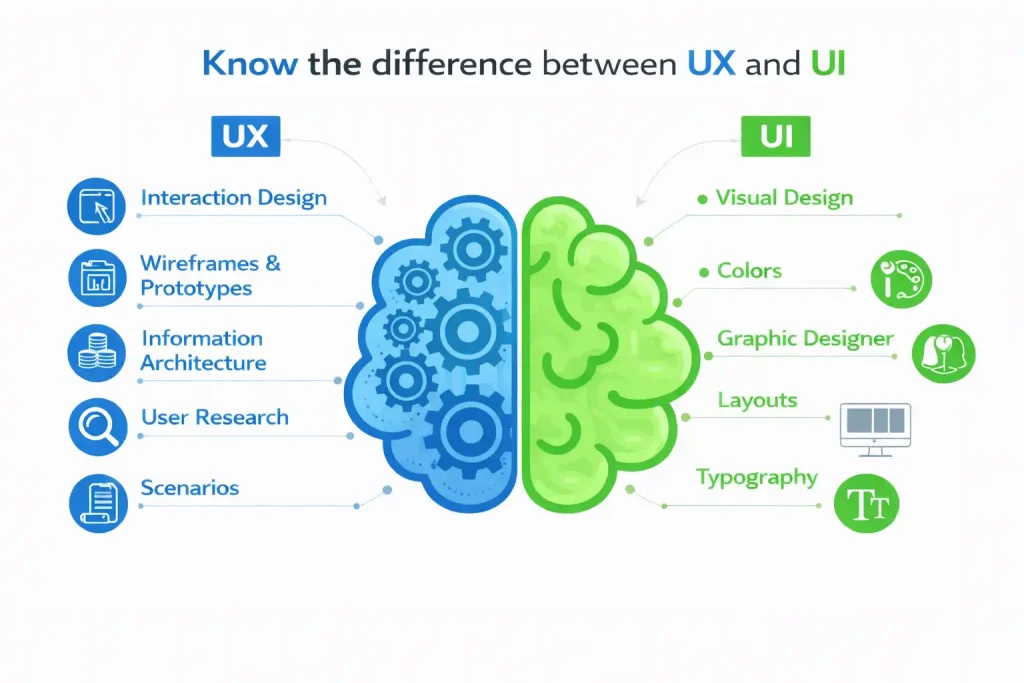
UI vs UX: The Core Differences
UI and UX often overlap, but they serve different purposes. Here is the difference between UI and UX design.
| UI Design | UX Design |
|---|---|
| Focuses on how the website looks | Focuses on how the website works |
| Deals with colors, fonts, buttons and layout | Deals with structure, flow and usability |
| Creates the first visual impression | Shapes the full user journey |
| Aims to make pages attractive and clear | Aims to make tasks easy and smooth |
| Concerned with visual consistency | Concerned with logic and navigation |
| Helps users notice actions | Helps users complete actions |
| Impact trust at first glance | Impact satisfaction over time |
UI answers: Does this look clear and trustworthy?
UX answers: Can I use this without effort?
A website needs both. One without the other creates gaps in the user journey.
Why UI and UX Must Work Together?
UI and UX are not separate steps. They support each other. A website can look beautiful, but if users feel lost, the design fails. A site can work well, but if it looks outdated, users lose trust.
When UI and UX align:
- Users stay longer
- Conversion rates improve
- Bounce rates drop
- Brand value grows
Think of UI as the surface and UX as the foundation. Both need strength.
How UI/UX Affects SEO?
Search engines do not only read content. They also notice how people interact with a website. When users stay longer, scroll pages and click links, it shows that the site is useful. When they leave fast, it sends a negative signal. This is where ui and ux play a strong role.
Good UI helps users read and scan content with ease. Clear headings, proper spacing and readable text keep users engaged. UX supports smooth navigation and logical flow, so users find what they need without frustration. Together, they improve time on site and reduce bounce rate.
A website that feels fast and easy creates a better experience for users. Search engines prefer such websites because they match user intent. Strong UI and UX do not replace search engine optimization; however, they support it in a very practical way.
UI/UX Design Process
A strong UI/UX process follows clear steps. Each step builds on the previous one. Skipping a step often leads to confusion, redesigns and poor consequences.
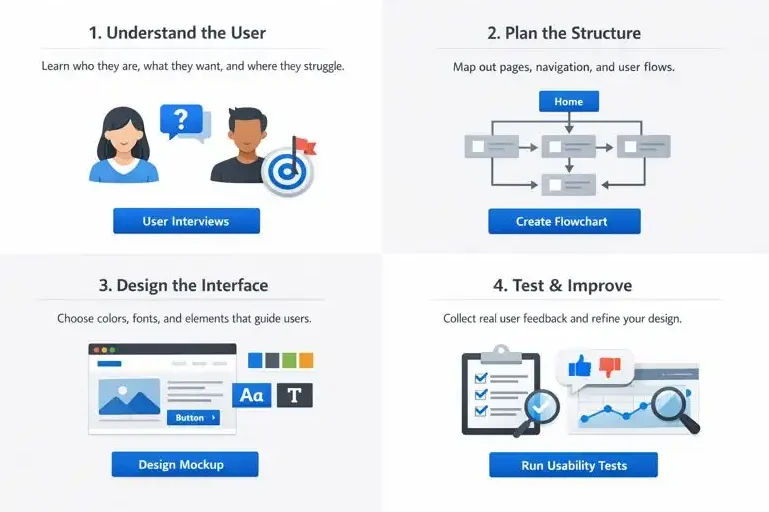
Understand the User
Design starts with understanding real users. This includes learning who they are, what they want to achieve and where they face issues. Designers observe user behavior, business goals and target audience needs before making any design selections. This step helps avoid assumptions and keeps the focus on people, not opinions.
Plan the Structure
Once user needs are clear, the next step is planning the structure. UX designers organize pages, define navigation and map user flows. This shows how users move from one page to another. A clear structure makes the website easy to explore and prevents users from feeling lost.
Design the Interface
After the structure is ready, UI designers focus on the visual layer. They choose colors, fonts, buttons and layouts that match the brand and support usability. The goal is not decoration, but clarity. Visual elements should guide attention and make actions obvious.
Test and Improve
Design does not end after launch. Real users interact with the website and reveal issues that designers may miss. Testing helps identify pain points, unclear steps and weak areas. Feedback leads to small improvements that make a big difference over time.
Common UI/UX Mistakes in Web Design
Many websites struggle not because of complex problems, but because of small design mistakes. These issues frustrate users, reduce trust and hurt performance. When UI and UX problems stack up, users leave before taking any action.
Common UI Mistakes
UI mistakes often affect how a website feels at first glance. Visual overload or poor readability can push users away.
- Using too many colors that distract users
- Choosing font sizes that feel hard to read
- Poor contrast between text and background
- Inconsistent buttons, spacing, or layouts across pages
Common UX Mistakes
UX mistakes affect how users move through a website. Even a good looking site can fail if the experience feels confusing.
- Navigation that feels unclear or crowded
- Too many steps to submit a form or complete a task
- Pages that load slowly on mobile or desktop
- Contact details that are hard to find
Fixing these issues makes a clear difference. Users feel more comfortable, trust the site more and complete actions with less effort. Better UI and UX lead to better results.
UI/UX and Conversion Rate
A website has a goal. It may be sales, leads or bookings. UI guides attention. UX removes obstacles.
Together they:
- Make calls to action clear
- Reduce form drop offs
- Increase trust
Small design changes can lead to big gains.
Why Businesses Should Invest in UI/UX
UI and UX aren’t about creating a website look good. They shape how people feel after they visit and use a site. When users trust a website, they stay longer and feel assured to do so. Clear design, simple navigation and smooth flow help businesses present themselves as reliable and expert.
Strong UI and UX also supported business growth. They help websites stand out in competitive markets, guide customers toward actions and inspire repeat visits. When a website feels smooth and comfortable to use, it turns into more than a digital presence. It becomes a practical tool that supports sales, leads and long term relationships.
Improve Your Website Experience
A website should guide users, build trust and support your business goals. With the right balance of UI and UX, your website feel clear, professional and easy to use for every visitor.
Our nettsidedesign.no team focus on creating websites that work for real users and real businesses. We design with clarity, usability and purpose, so your website looks good.
Whether you need a new website or want to improve an existing one, strong UI and UX can help turn visits into actions and support long term growth. Contact us and let’s get started.
Key Takeaways
UI and UX are different, but both are needed for a successful website.
UI focuses on how a website looks, while UX focuses on how it works.
A good looking website fails if users feel confused.
A simple and clear design helps users trust a business.
Easy navigation saves users time and reduces frustration.
Strong UI and UX help to improve SEO through better user behavior.
Mobile responsive design is important for modern users.
Small design mistakes can cause users to leave fast.
Testing and improving design leads to better results over time.
A well designed website supports growth, conversions and long term trust.
FAQs
What does a ui ux designer do?
A UI/UX designer creates websites and apps that look clear and feel easy to use. They focus on layout, visuals, navigation and the full user journey to help users reach their goals without confusion.
What is the difference between ux designer and ui designer?
A UX designer works on structure, flow and usability. A UI designer works on colors, fonts, buttons and layout. UX plans how things work, while UI decides how they look.
How to become a freelance ui ux designer?
Start by learning the basics of UI and UX design. Practice on sample projects, build a simple portfolio and show your design process. Over time, take small projects and grow through experience and feedback.
How to practice ui ux design?
Practice by redesigning existing websites, creating wireframes and testing designs with real users. Study good websites, learn from user behavior and improve designs based on feedback.