Are visitors leaving your website without reaching out? Do you get traffic but few inquiries or leads? Many businesses face this problem. Users may like your services, but they won’t always open their email or make a call. Most of them leave.
The real problem is not traffic, it’s communication. If your web design does not make it easy to contact you, you risk losing leads, sales and trust. A contact form solves this issue by giving visitors a clear and simple way to start a conversation.
Key Highlights:
- A well designed contact form turns visitors into real leads.
- Optimized forms improve user experience and save time.
- WordPress makes it easy to build, customize and manage forms.
- Avoiding common mistakes ensures your form is effective and trusted.
For businesses working with Nettsidedesign, a contact form is not only an extra feature. It’s a core element of a website that delivers results.
In this blog, you’ll learn what a contact form is and why you should use a contact form on your website, important elements and how to optimize your contact form for more leads.
What is a Contact Form?
A contact form is a section on your website where users fill in their details and send you a message. It usually includes fields like name, email, phone number and message. It works as a digital bridge between you and your potential customers.
Instead of copying your email address or calling, visitors can contact you directly from your site. The message goes straight to your inbox or your CMS system. This makes communication faster and more organized for your business.
Why is a Contact Form Important for Your Website?
A contact form plays an important role in how people interact with your business online. It removes barriers and makes communication simple.
When visitors find an easy way to reach you, they feel more confident and more likely to take the next step. This small feature often decides whether a visitor becomes a lead or leaves your site.
A connect form connects your business with real people who are ready to talk. Without it, even the best website can struggle to generate results.
Important Elements of an Effective Contact Form
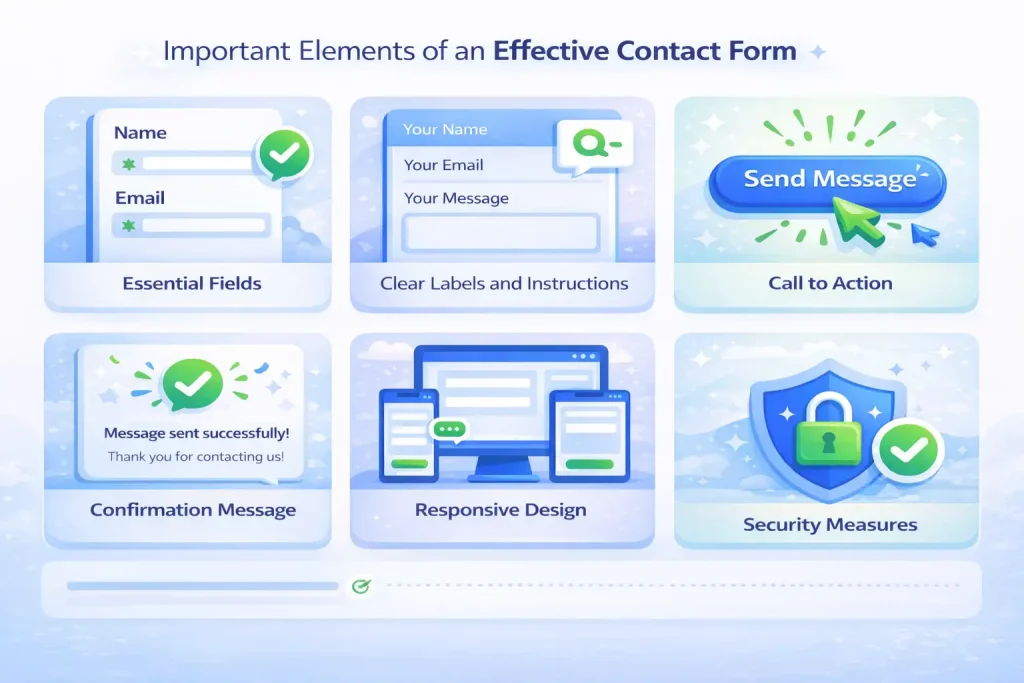
Here are the important elements every contact form should have to work well:
Essential Fields
Include only the fields you really need. Common ones are:
- Name
- Email address
- Phone number (optional)
- Message or inquiry
Too many fields can discourage users. Keep it short and focused.
Clear Labels and Instructions
Every field should be easy to understand. Use simple language. If a field needs clarification, add a short hint or example.
Call to Action
The submit button should be simple and clear. Text like “Send Message” or “Get in Touch” tells users what will happen.
Confirmation Message
After submission, display a short message confirming the form was sent. This reassures users and improves their experience.
Responsive Design
Your form must work on all devices. Mobile users should be able to complete it easily without zooming or scrolling too much.
Security Measures
Use tools like Captcha or spam filters. This protects your business and keeps users’ data safe.
Optional Extra Elements
You can include:
- Dropdowns for service types
- Checkboxes for newsletters
- File upload for documents or resumes
These elements help collect more relevant details, but only if they add real value.
What Your Business Gains From a Strong Contact Form?
A good contact form does more than collect messages. It connects visitors to your business. When the form is easy and clear, it builds trust. Here are the following benefits of the contact form:
Generate More Leads
A simple form encourages more people to reach out. The easier it is to submit, the higher the chance visitors become real leads.
Improve User Experience
Visitors want a quick and smooth way to communicate. A clear form guides them step by step and reduces confusion.
Keeps Inquiries Organized
A structured form collects all necessary details. Your team can respond faster and never miss important information.
Builds Trust and Credibility
A professional looking form shows you care about user experience. It signals reliability and helps turn visitors into customers.
Protects Your Business
Forms with security measures block spam and protect user data. This safeguards both your business and your visitors.
How to Optimize Your Contact Form for More Leads?
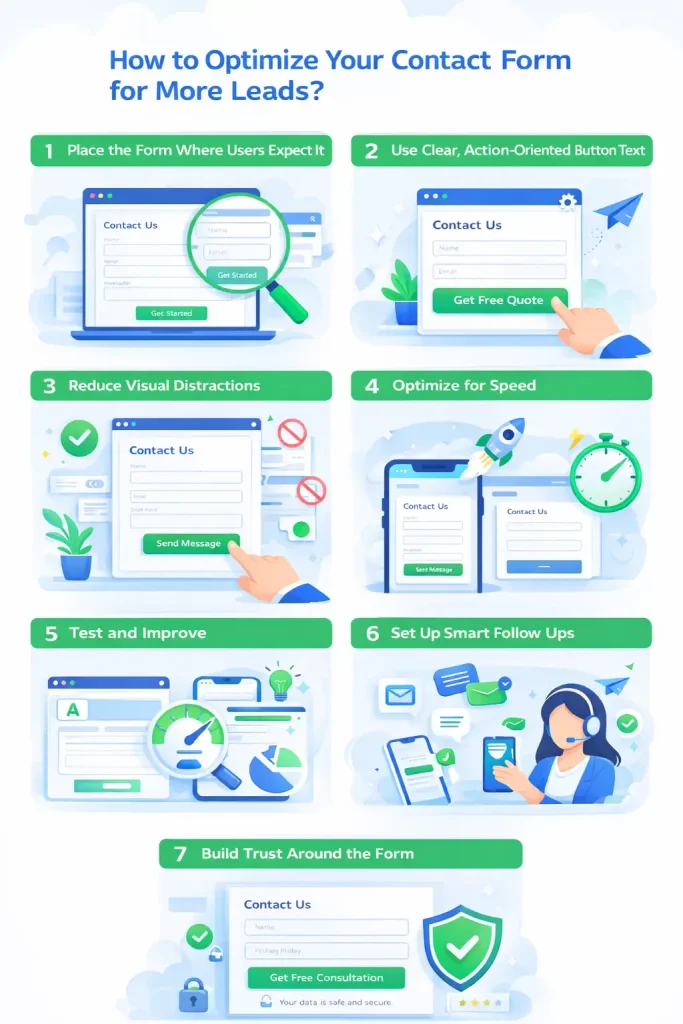
Optimizing a contact form means improving how users interact with it, not just what fields it contains. The goal is to reduce friction, increase trust and guide visitors smoothly toward submission.
1. Place the Form Where Users Expect It
Your contact form should be easy to find. The best places are:
- A dedicated Contact page
- At the end of service pages
- Above the footer or in a clear section
If users have to search for the form, they are more likely to leave.
2. Use Clear, Action Oriented Button Text
Avoid generic button text like “Submit.” Instead, use text that explains the benefit, such as:
- Send Message
- Request a Quote
- Get in Touch
This reassures users and increases clicks.
3. Reduce Visual Distractions
Keep the form area clean and focused. Avoid:
- Too many colors
- Unnecessary images
- Long paragraphs near the form
A simple layout helps users concentrate on completing the form.
4. Optimize for Speed
A slow loading form can cost you leads. Use lightweight plugins and avoid scripts that delay loading. Fast forms improve user experience and support better SEO performance.
5. Test and Improve
Small changes can make a big difference. Test:
- Button text
- Form placement
- Number of fields
- Headings above the form
Tracking form submissions helps you understand what works best.
6. Set Up Smart Follow Ups
Connect your form with email or CRM tools. Automatic replies confirm the message was received and show professionalism. Fast follow ups increase the chance of conversion.
7. Build Trust Around the Form
Add trust signals near the form, such as:
- Short privacy notice
- “We never share your data” message
- Company contact details
These details reduce hesitation and encourage users to submit.
Why WordPress is a Good Choice for Contact Forms?
WordPress gives you full control over your contact forms. You can customize design, add security features and manage submissions in one place. This makes WordPress a reliable choice for businesses that want simple but powerful communication tools.
It supports many popular form plugins like Contact Form 7, WPForms and Gravity Forms. These tools let you build forms using drag and drop features, so no coding is required. You can easily add or remove fields based on your goals.
WordPress also integrates well with email services and CRM systems. This means messages can go to your inbox or be stored for future follow ups. You can even set automatic replies to confirm submissions.
Another advantage is design flexibility. You can style your forms to match your brand and website layout. This keeps everything consistent and professional.
In simple terms, WordPress makes contact forms easy to build, easy to manage and easy to scale as your business grows.
Common Errors to Avoid in Contact Form Design
Here are some common mistakes you should avoid:
- Asking for too much information and making the form feel long.
- Using unclear or confusing field labels.
- Hiding the form so that users cannot find it easily.
- Not showing a confirmation message after submission.
- Having a form that does not work well on mobile devices.
- Ignoring basic security and spam protection.
- Using a slow or heavy form that takes time to load.
These mistakes reduce trust and push visitors away. A good contact form should feel easy, visible and reliable for every user.
Closing Thoughts
In my view, a contact form is one of the simplest tools with the biggest impact on a website. It connects your business with real people, organizes inquiries, and builds trust without extra effort. A well designed form not only improves communication but also helps turn visitors into leads, making it an important part of any effective website strategy.
Ready to Improve Communication on Your Website?
Your website should do more than look good. It should help people contact you easily. A well designed contact form makes this possible. It removes barriers and gives visitors a clear path to reach your business.
Nettsidedesign designs simple, effective contact forms that match your brand and support your goals. If your website is not bringing in enough inquiries, it may be time to improve how people connect with you. Contact us and let’s get started
Key Takeaways
- A contact form makes it easy for visitors to reach your business.
- Clear, focused fields encourage more users to submit messages.
- Responsive forms work on all devices, improving user experience.
- Confirmation messages reassure users that their inquiry was received.
- Security features protect both your business and visitors.
- Well placed forms turn visitors into leads and support growth.
- WordPress offers flexible, easy to use tools for building and managing forms.
- Avoid common mistakes such as long forms, unclear labels, hidden forms, and poor mobile support.
- A professional contact form builds trust and strengthens your brand.
FAQs
Are contact forms a good idea on websites nowadays?
Yes, contact forms are still one of the easiest ways for visitors to reach your business. They make communication simple, organized and professional.
Why do bots fill out forms?
Bots fill out forms automatically to send spam or test vulnerabilities. They are not real users and usually aim to overload your inbox or steal information.
How does a contact form on a website work?
Visitors fill in their details on the form and click submit. The message goes to your inbox or CRM system. Some forms also send an automatic confirmation to the user.
Why do people spam contact forms?
Spam happens when people or bots send unwanted messages. This can be for marketing, phishing, or testing forms. Using security tools like Captcha helps prevent it.
Are contact forms outdated?
No, contact forms remain effective. They provide structure, security and a simple way for users to get in touch, which email links or phone numbers alone cannot always do.